
WHAT'S NEW IN TERRITORY MANAGER?
Find out here about the latest new features in the Territory Manager application: Spring '26, Spring '26, Fall '25, Summer '25, Spring '24, Fall '24, Spring '24, Fall '23, Summer '23, Spring '23, Fall 2022, Summer 2022, Spring 2022, Summer 2021, Winter 2021, Summer 2020, Winter 2019, version 6 et version 5.

Summer '26 version
Publishing date : 07/07/2026
Main new features
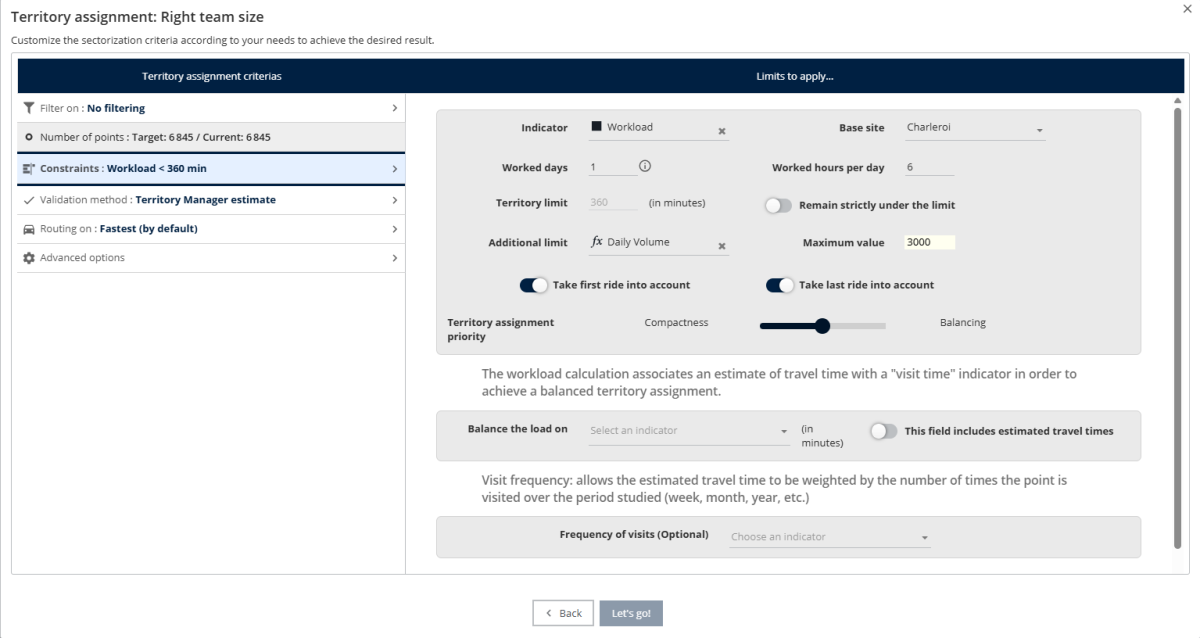
Right team size
The ability to add a second factor limiting a resource's work has been added.
For example, optimize the workload while limiting the total volume or weight of deliveries. Or, limit the sum of the sizes of visited stores, or the sum of the sales figures associated with assigned customers.
New "Enterprise" work mode
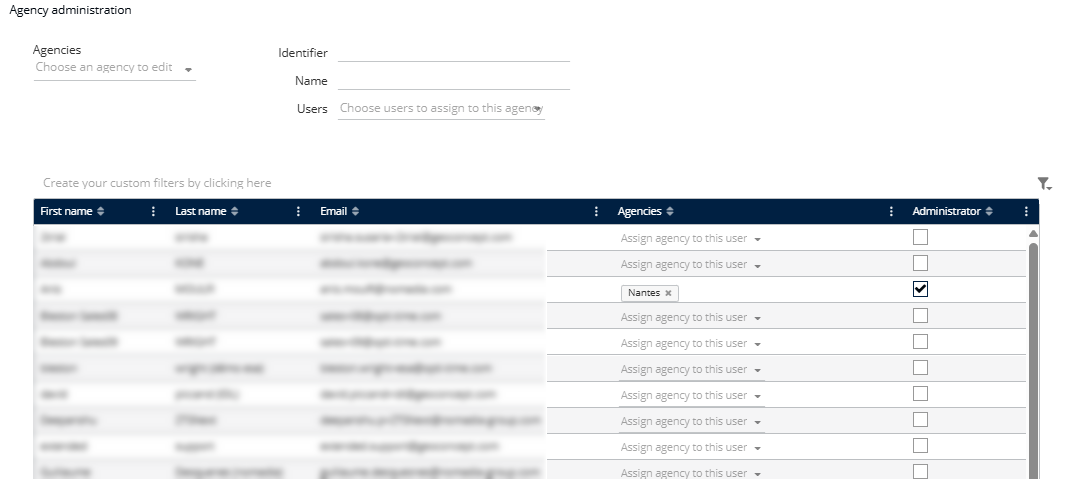
Territory Manager allows you to save your work linked to your account (email). You can then send copies to colleagues.
If you have many colleagues, or multiple Territory Manager accounts, it is sometimes easier to save the work relatively to an agency rather than associating it with an individual.
In this case, several people can view the same study; simply grant access rights to the relevant individuals for each agency.
Contact your sales representative to learn more about how to migrate to this new mode.
- Formulas: Indicators are now inserted at the cursor rather than at the end.
- Formulas: The display format can now be chosen during creation.
- Formulas: The Close button is always active; a message now reminds the user to save their changes.
- Indicators Table: Partial sums based on selection are now possible in the Sites and Sectors tabs (as with points previously).
- Indicators Table: A tool has been added to copy to the clipboard (for pasting into an external spreadsheet).
- Studies can now be duplicated.
- Excel Export: The Site Id and Site Name fields have been added to the Sectors tab.
- Break the Sharing link to download a copy of the study
- Themes: Number of ranges raised to 50 in thematics, to allow for repurposing them to display a wide variety of logos on the points
- Adding data: Option to automatically assign unassigned values ??at the end of the import
Spring '26 version
Publishing date: 17/02/2026
Various improvements
- Added features to the API (function to obtain the geometry of a set of postal codes, option to force the display mode of sectors, option to force the naming of sectors according to a provided rule)
- Addition of 2025 Q3 administrative data (postcodes, cities, etc.)
- Fixing slow display times in Chrome
- Fixed a bug where visit frequencies were not being taken into account in Optimal Team Size mode
- Fixed a bug related to adding an indicator to an existing simulation

Spring '26 patch 1 version
Publishing date : 29/04/2026
Various fixes
- Right team size: possibility to have a value with decimals for the working time per day
- Right team size: correct consideration of visit frequencies
- Right team size: disabling the Stop button if an impossibility is detected.
- Right team size: handling the impossibility condition of the case in territory assignment on geographical entities (maximum visit time compared to the total time and not to the time per day)
- Bug loading travel times when reopening a study
- Empty thumbnail in certain cases of simulation recording
Spring '26 version
Publishing date: 17/02/2026
Various improvements
- Added features to the API (function to obtain the geometry of a set of postal codes, option to force the display mode of sectors, option to force the naming of sectors according to a provided rule)
- Addition of 2025 Q3 administrative data (postcodes, cities, etc.)
- Fixing slow display times in Chrome
- Fixed a bug where visit frequencies were not being taken into account in Optimal Team Size mode
- Fixed a bug related to adding an indicator to an existing simulation